My E2 is -2 but the formula does not show the text ‘No Stock’
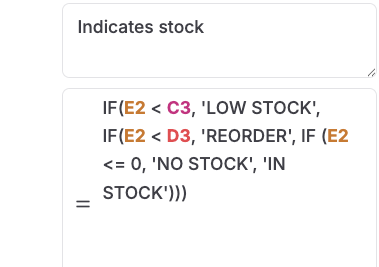
I would like to start the “IF (e2 <= 0” on the next line but how to do that? Normal shift-enter does not work. Apple M4, Chrome.
My E2 is -2 but the formula does not show the text ‘No Stock’
I would like to start the “IF (e2 <= 0” on the next line but how to do that? Normal shift-enter does not work. Apple M4, Chrome.
@Folkerth
Hi, I think the formula should be, you want to check the negative condition first and follow the rest of the conidtions.
IF(E2 <= 0, ‘NO STOCK’,
IF(E2 < C3, ‘LOW STOCK’,
IF(E2 < D3, ‘REORDER’, ‘IN STOCK’)))
Please check if that works.
HI @admin ,
I guess that will work but the formula-editor does not allow me to add a new line with shift-enter at the top of the formula. The editot needs an upgrade. Also for larger formula’s it would be great if the edit-popup could be a bit wider and larger.
Hi @Folkerth you can just copy paste the formula without new lines. The system will work without any new lines in the formulas. So you don’t need to have to introduce new lines.
Noted about improving the formula editor popup. We are working on improving that.
I did that from your suggested formula but somehow a CHR(13) slipped in the copy/paste, causing a sytax error.
I think that the forum is adding characters to the response.
here’s the plain formula
IF(E2 <= 0, 'NO STOCK',IF(E2 < C3, 'LOW STOCK',IF(E2 < D3, 'REORDER', 'IN STOCK')))
Hope this works.
Solved. Thanks. In the documentation something about the order of conditions?