Happy Halloween! 
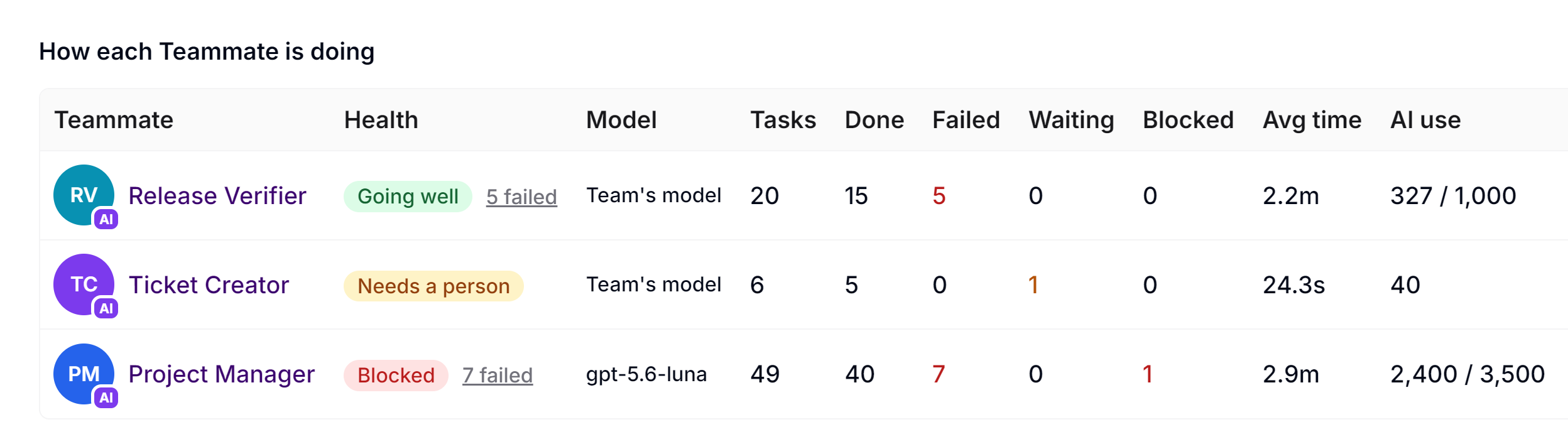
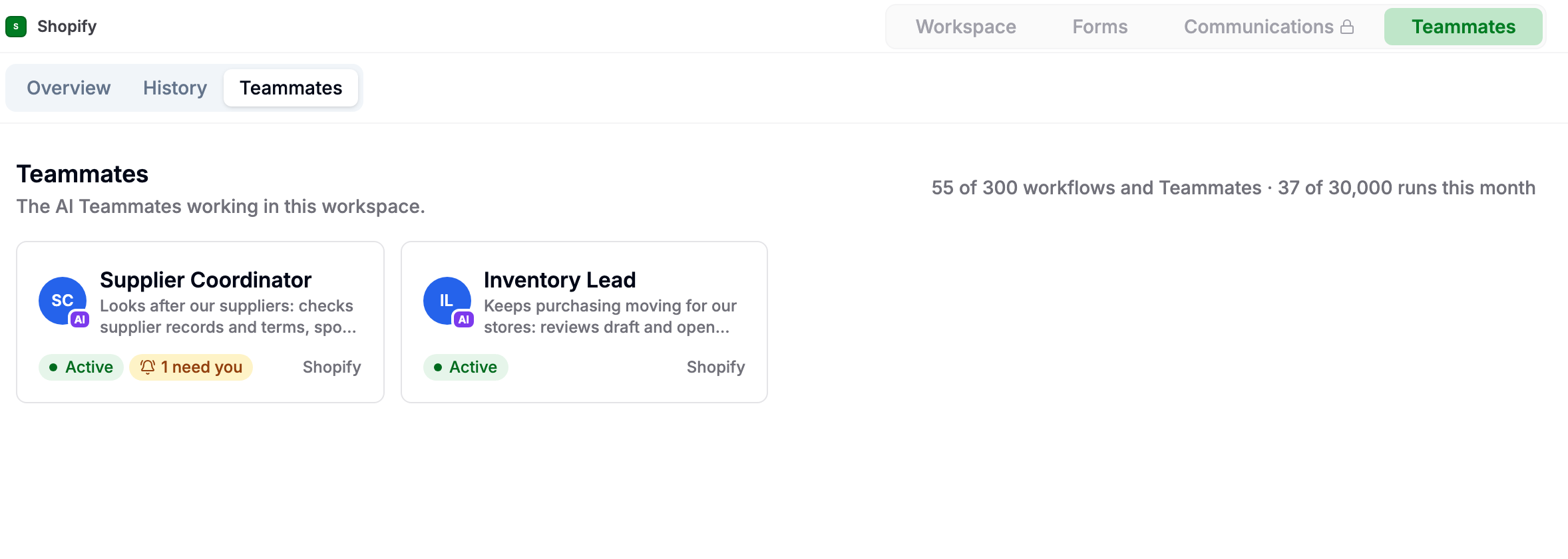
- Featured: AI Teammates: Add AI workers to your team, give each one a job and workspace access, then hand off work by assignment, @mention, chat, schedule, workflow, or another Teammate. Teammates act under their own identity, can collaborate with people and other Teammates, and keep a visible history of their work. AI Teammates | AnyDB

-
AI Teammate Operations and Safeguards: Added Teammate dashboards, task history, approvals and questions that need a person, schedules and budgets, skills, memory and reflection, connected accounts, inbox ownership, API-domain controls, access checks, health alerts, and policy-based action controls. More Information: Teammate Dashboard, Job and Access, Skills and Memory
-
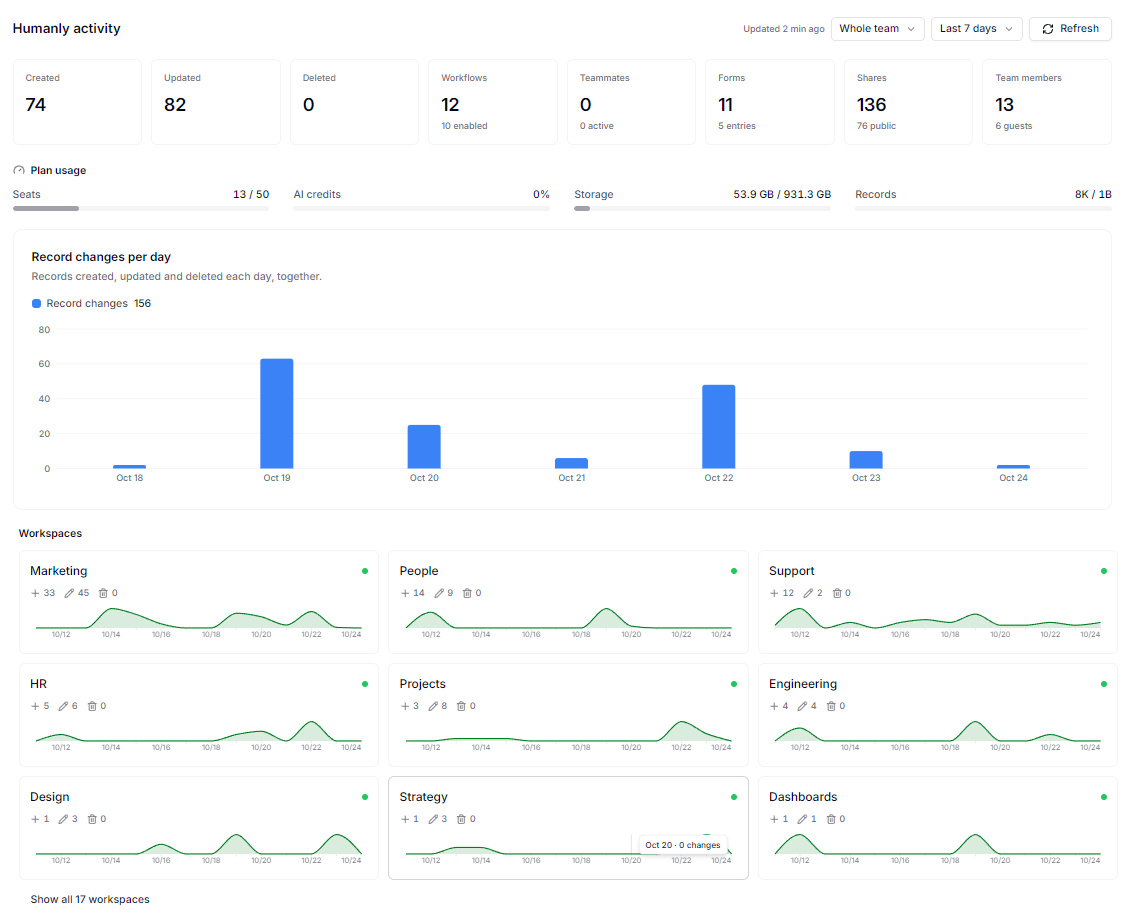
Team and Workspace Overview: Team administrators can see activity across records, forms, workflows, Teammates, members, shares, plan usage, and individual workspaces from a new Overview. Workspace activity views show the same operational picture for one workspace.
-
Compliance Profiles and Checks: Team administrators can start with ITAR, SOC 2, and personal-data templates or build their own rule sets, limit a profile to selected workspaces, run read-only checks, review findings by workspace, open past checks, and download results as CSV. Teammates with audit access can also monitor compliance and security health. More Information: Compliance
-
Apps and Connected Accounts: Team owners can browse and install Apps, review requested permissions, bind Apps to workspaces, launch them from a workspace or direct link, and manage updates, health, and connections. People and team administrators can also review connected OAuth apps, and Teammate connections can be tested or have their credentials replaced without removing the connection. More Information: Managing Apps, Teammate Connections
-
Team Single Sign-On: Business and Enterprise teams can connect Okta or Microsoft Entra ID through OpenID Connect, use a custom URL or team sign-in link, and choose whether new users join as members, guests, or require owner approval. More Information: Single Sign-On
-
Email Communications and Help Desk: Workspaces can connect IMAP and SMTP mailboxes, sync and organize threaded conversations, track unread messages, reply or reply all with attachments, retry failed sends, and optionally turn incoming email into numbered help-desk tickets. More Information: [Email Inbox]
(Email inbox | AnyDB), Email Help Desk -
Incoming Webhooks: Business and Enterprise teams can receive signed JSON or Framer form submissions, map incoming fields to AnyDB cells, inspect captured deliveries, and create records automatically. More Information: Incoming Webhooks
-
Kanban Views and Child Filters: Added Kanban layouts with configurable columns, card previews, drag-and-drop updates, background colors, and inline record creation. Views and listings can also filter parent records using values from their child records.
-
Expanded Reports: Reports can be organized into folders with drag and drop, group records by each value in a multi-select field, filter using child-record values, and include related children, connected records, or records that reference each result. More Information: Reports
-
E-Signatures and Generated Documents: Signature cells support signing from shared records and forms, including signer name and email. Generated Word and PDF documents can include the signature image, signing time, name, and email.
-
Richer Text and Page Editing: Rich-text cells now support Markdown. The page editor adds tables, images, links, mentions, collapsible sections, image operations, and AI-assisted rewriting and improvement tools.
-
Views, Forms, and Record History: Saved views show record counts, list and grid layouts can create records directly, Quick View can open in form mode, and record version history provides clearer per-version change details.
-
New Formula and Permission Tools: Added
REGEXTEST,REGEXEXTRACT, andREGEXREPLACEfor pattern-based text handling;S@Record_Namereferences for reading values from a named record; andINCONTEXT/NOTINCONTEXTfor form-aware locking rules. More Information: [Formula Function Index]
Oct 29, 2026
-
Make Triggers by Type and Parent: The Make Watch a record for updates and Watch for new record triggers can be narrowed by Record Type (including File) and Parent Record ID, the same as Zapier. For example, they can run once for each file uploaded to a folder. More Information: Make.com Integration
-
Zapier Triggers by Type, Parent and Condition: The Zapier New Record and Updated Record triggers can be narrowed by Record Type (including File, Folder, Page and Link), Parent Record ID and a Filter, the same conditions as workflow triggers. For example, they can copy only files uploaded to one folder to Google Drive. Requires AnyDB Zapier app 1.2.1. More Information: Zapier Integration
-
Text Operators in Conditions: Workflow trigger conditions and Zapier filters support
CONTAINS,STARTSWITHandENDSWITH. Conditions are now evaluated as data rather than code. More Information: Condition syntax
Sep 11, 2026
-
AnyBot Model Controls: Team administrators can choose and lock the team’s AI model and reasoning level. When multiple models are available, users can choose a model for an individual conversation and see its relative usage cost.
-
AI in Automations and Scripts: Added an AI action to the automation editor and support for running AI tasks from scripts, including tasks that use record attachments.
-
Communications: Added WhatsApp conversation support, including inbound and outbound messages, media attachments, a dedicated conversation view, and team-level configuration.
-
Record Audit Formulas: Added
RECORD_USER("created", "email")andRECORD_USER("updated", "email")to capture the email of the user who created or most recently updated a record. More Information: RECORD_USER -
New Array & Threshold Formulas: Added
MINBY,FLATTEN,SORTBY,THRESHOLDBYSUM, andMINIFfor working with arrays of child-record data — finding the min/max object by a property, combining per-child arrays into one, sorting by a property, and finding where a running sum first crosses a threshold or the min/max value matching a condition. More Information: Formula Function Index -
Files and Exports: Added drag-and-drop file uploads and more file details in listings.
-
Views and Navigation: Improved long record-name display, root-folder listings, System views, dynamic page titles, and refreshing Types from the Home page. Fixed stale View permissions and guest editing failures in shared Views.
-
Workspace Time Zones: Workspace administrators can now choose a time zone. Dates and times are interpreted consistently across records, formulas, reports, generated documents, exports, and scheduled automations.
Aug 30, 2026
-
Custom Report Builder: Added saved workspace Reports with filtering, grouping, configurable Sum, Avg, Min, Max, and Count aggregations, Grand Totals, optional detail rows, and bar, pie, or line charts. Reports can be exported as CSV or XLSX, or moved between workspaces using Report archives. More Information: Reports
-
AnyDB MCP: Added secure remote MCP connector access at
https://mcp.anydb.comwith OAuth support for Claude, ChatGPT, and other compatible MCP clients. More Information: AnyDB MCP -
Migration Fix: Fixed an issue that could prevent cells with cell comments from migrating correctly.
-
Type Designer Fix: Fixed an issue where cells could not be deleted from the Type Designer.
-
View Filter Fix: Fixed the Checked Equals True filter so it correctly returns checked records in Views.
Aug 13, 2026
-
Standard Business Object Library added to allow users to quickly add common business objects such as Customers, Vendors, Products, and Employees to their AnyDB workspace.
-
Migration Tool added to allow users to migrate their existing data from other systems into AnyDB. The migration tool supports CSV, Excel, and JSON file formats.